用 Hermes Agent 差不多 2 个月了。 一直被一个问题困扰,在接 QQ 机器人的时候,如果一段时间没发消息,bot 就会悄悄掉线。
查了一下 gateway 日志,每隔约 30 分钟就会出现一条:
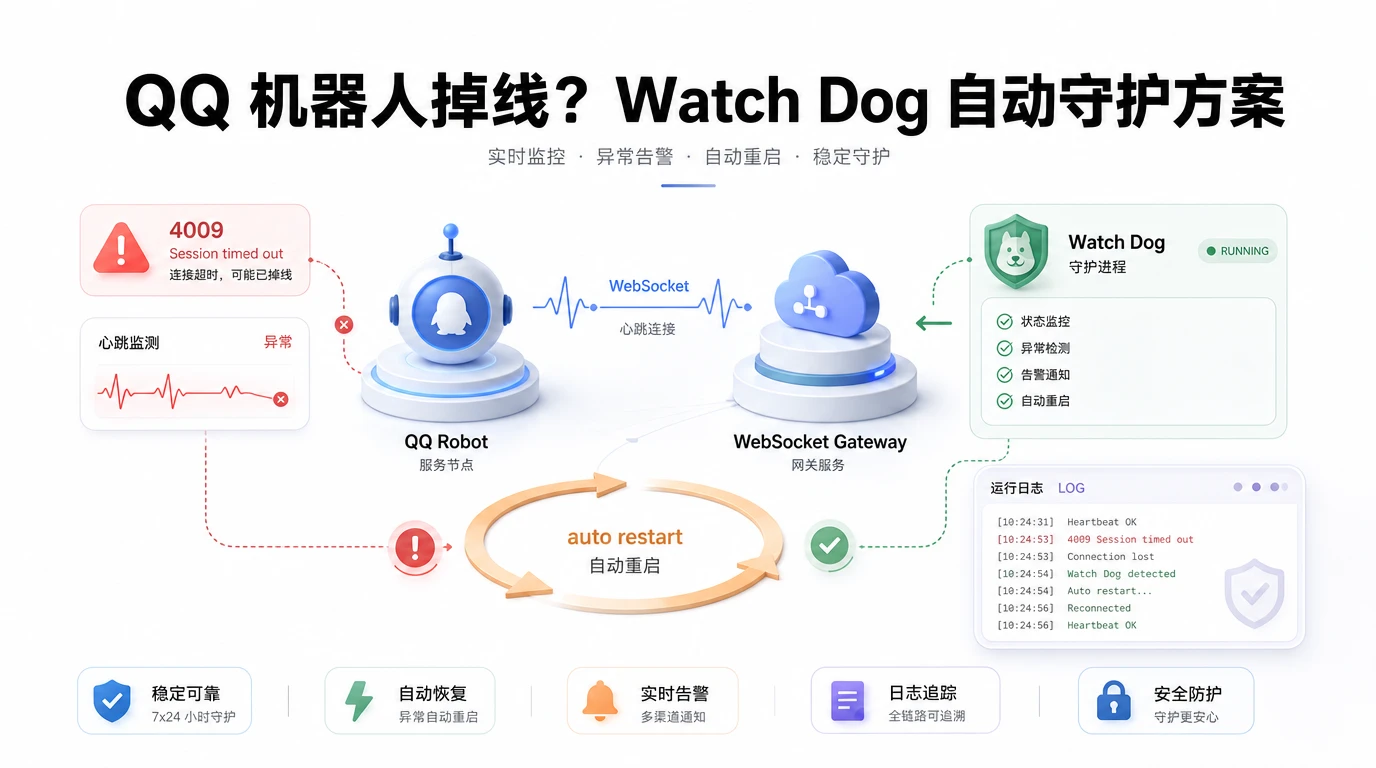
WebSocket closed: code=4009 reason=Session timed out
4009 是 QQ 官方 WebSocket 网关的会话超时错误码。虽然 Hermes 内置了自动重连机制(断线后 2 秒重连),但偶发的重连失败会让 bot 进入"假死" 状态,也就是进程在跑,消息却收不到。
问题出在哪?其实就在 QQ 的 WebSocket 协议设计。
QQ 官方要求客户端在收到 Hello 事件后定期发心跳包,默认间隔约 41 秒。Hermes 按 80% 间隔(约 33 秒)发送心跳,理论上没问题。但 QQ 服务端还有另一层逻辑:长时间没有业务流量的会话会被判定为 idle,直接踢掉。
也就是说,即使心跳正常,"没人聊天" 一样会被踢掉。
这跟 Telegram 或 Discord 的 bot 不一样。Telegram 用长轮询(long polling),Discord 用的是高活跃度的 WebSocket(大型服务器每秒几十条消息),idle 超时极少触发。QQ 的 C2C(私聊)场景天然低频,而问题就出现在这。
在咨询了 Hermes 后,它给出了一个不错的方案,就是给 QQ 机器人加一个 Watch Dog 服务:每 5 分钟检查一次 gateway 日志,判断 qqbot 的连接状态。正常就静默退出,断连就自动重启 gateway。
Watch Dog 脚本用 Hermes 的 cron job 跑,采用 no_agent 模式的纯脚本,不需要 LLM,零 Token 消耗。
关键判断逻辑:
- 检查 gateway 服务是否在运行
- 查看最近日志里断连事件是否在重连事件之后
- 检查最近 5 分钟内有没有 Session timed out 但没有成功重连的情况
跑了一天,效果不错。之前隔三差五就要手动重启,现在全自动化了。
对了,如果 Watch Dog 脚本触发重启,它会通过 QQ 给我发一条通知。正常情况下则什么都不发。
Watch Dog
#!/bin/bash
# QQBot Watchdog - Check qqbot connection, restart gateway if disconnected
# Runs every 5 minutes via Hermes cron (no_agent mode)
set -euo pipefail
LOGFILE="$HOME/.hermes/logs/qqbot-watchdog.log"
MAX_LOG_LINES=200
log() {
echo "[(date′+*" >> "$LOGFILE"
}
# Rotate log if too large
if [ -f "$LOGFILE" ]; then
lines=(wc−l<"LOGFILE")
if [ "lines"−gt"MAX_LOG_LINES" ]; then
tail -n "MAXLOGLINES""LOGFILE" > "LOGFILE.tmp" && mv "LOGFILE.tmp" "$LOGFILE"
fi
fi
# Check if gateway service is running
if ! systemctl --user is-active --quiet hermes-gateway.service 2>/dev/null; then
log "WARN: Gateway service not running, starting it"
hermes gateway start 2>&1 >> "$LOGFILE"
echo "⚠️ QQBot 看门狗:Gateway 服务未运行,已尝试重启"
exit 0
fi
# Check qqbot connection from recent gateway logs
GATEWAY_LOG="$HOME/.hermes/logs/gateway.log"
if [ ! -f "$GATEWAY_LOG" ]; then
log "ERROR: Gateway log not found at $GATEWAY_LOG"
echo "⚠️ QQBot 看门狗:找不到 gateway 日志文件"
exit 0
fi
# Get the last 50 lines of gateway log for analysis
RECENT=(tail−50"GATEWAY_LOG")
# Find the most recent connection state events
LAST_DISCONNECT=(echo"RECENT" | grep -n 'WebSocket closed\|WebSocket error\|Reconnect failed\|Still not connected\|Disconnected' | tail -1)
LAST_CONNECTED=(echo"RECENT" | grep -n 'Ready\|Reconnected\|qqbot connected' | tail -1)
# Extract line numbers for comparison
DISCONNECT_LINE=""
CONNECT_LINE=""
if [ -n "$LAST_DISCONNECT" ]; then
DISCONNECT_LINE=(echo"LAST_DISCONNECT" | cut -d: -f1)
fi
if [ -n "$LAST_CONNECTED" ]; then
CONNECT_LINE=(echo"LAST_CONNECTED" | cut -d: -f1)
fi
# If last disconnect happened AFTER last connect, qqbot is likely disconnected
if [ -n "$DISCONNECT_LINE" ]; then
if [ -z "CONNECTLINE"]∣∣["DISCONNECT_LINE" -gt "$CONNECT_LINE" ]; then
log "WARN: QQBot appears disconnected. Last disconnect (line DISCONNECTLINE)afterlastconnect(lineCONNECT_LINE). Restarting gateway."
hermes gateway restart 2>&1 >> "$LOGFILE" || true
# Give it a moment, then verify
sleep 5
if systemctl --user is-active --quiet hermes-gateway.service; then
echo "🔄 QQBot 看门狗:检测到断连,已重启 gateway"
else
echo "❌ QQBot 看门狗:重启后 gateway 仍未运行,请手动检查"
fi
exit 0
fi
fi
# Also check: has there been any heartbeat timeout in the last 5 minutes WITHOUT reconnect?
LAST_5MIN=$(date -d '5 minutes ago' '+%Y-%m-%d %H:%M' 2>/dev/null || date -v-5M '+%Y-%m-%d %H:%M')
RECENT_5MIN=(tail−200"GATEWAY_LOG" | awk -v ts="LAST5MIN"′0 >= ts')
TIMEOUT_IN_5MIN=(echo"RECENT_5MIN" | grep -c 'Session timed out' 2>/dev/null || echo "0")
RECONNECT_IN_5MIN=(echo"RECENT_5MIN" | grep -c 'Reconnected\|Ready' 2>/dev/null || echo "0")
if [ "TIMEOUT_IN_5MIN" -gt 0 ] && [ "RECONNECT_IN_5MIN" -eq 0 ]; then
log "WARN: Session timeout detected without successful reconnect in last 5min. Restarting gateway."
hermes gateway restart 2>&1 >> "$LOGFILE" || true
sleep 5
echo "🔄 QQBot 看门狗:检测到超时未重连,已重启 gateway"
exit 0
fi
# All good - quiet exit (no output = no notification)
log "OK: QQBot connected and healthy"
exit 0